
ARCHMATERIA— A curated platform for architectural material discovery
Role: Founding Product & UX/UI Designer · Brand Strategy & Identity
Duration: Ongoing project
Platform: Responsive Marketplace Platform Desktop · Tablet · Mobile Focus: Product Discovery · Brand Identity · UX/UI Design · Information Architecture · Usability Testing Design System
Tools: Figma · FigJam · Figma Make · Figma Agent · Adobe Creative Suite · AI-assisted Workflows
Project Overview
ArchMateria is a bilingual B2B platform connecting architects and design professionals with architectural material manufacturers. It combines visual discovery, detailed product information and enquiry workflows, allowing users to explore, evaluate, save and request materials.
Its long-term vision includes a 3D Simulation Workshop, where architects could visualise materials in architectural environments before making sourcing decisions.
As the founding designer, I led the brand and end-to-end UX/UI design while helping the founders clarify their product vision, align priorities and establish a practical first release.
01. The Challenge
Turning an Ambitious Concept into a Clear Product Direction
The founders had a strong business vision but lacked a cohesive brand identity and clearly structured digital experience.
Their initial wireframe explored various platform features but lacked a defined information architecture, user journeys and content hierarchy. Different stakeholder perspectives and evolving requirements added complexity to defining the initial product scope.
Three challenges emerged:
● Product Structure: Organising complex material information, filtering and sourcing journeys into an intuitive discovery experience.
● Stakeholder Alignment: Translating evolving ideas and requirements into a shared product direction and clear priorities.
● Brand & Scope: Creating a premium, architecture-focused identity while balancing essential sourcing features with ambitious concepts such as the 3D Simulation Workshop.
Design Challenge
How might we create an intuitive, visually inspiring materials platform that balances user needs, business objectives and delivery feasibility?
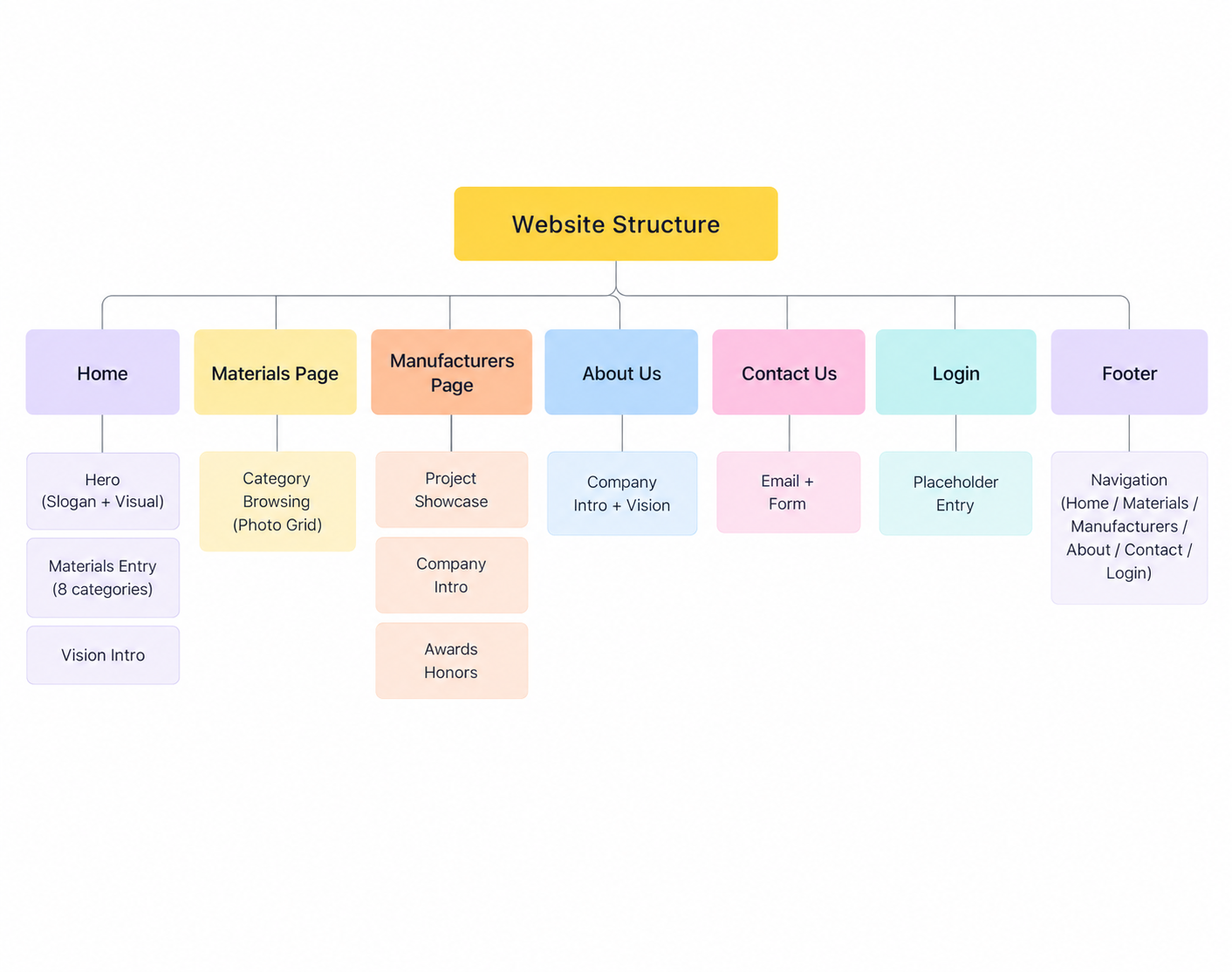
Initial Information Architecture — Mapping the proposed platform structure for stakeholder discussion.
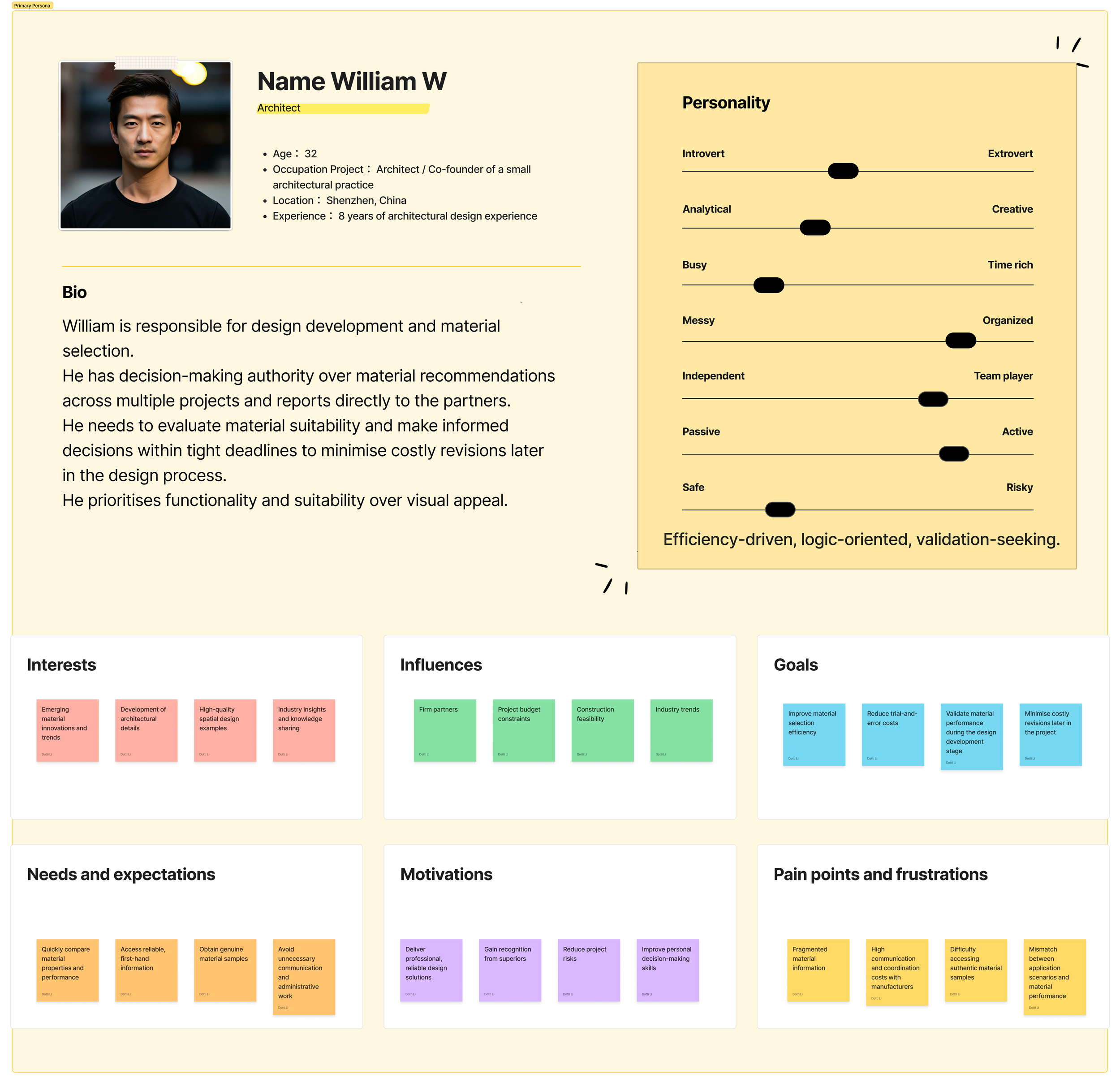
Primary Persona — An architect focused on material selection, efficiency and reliable specifications.
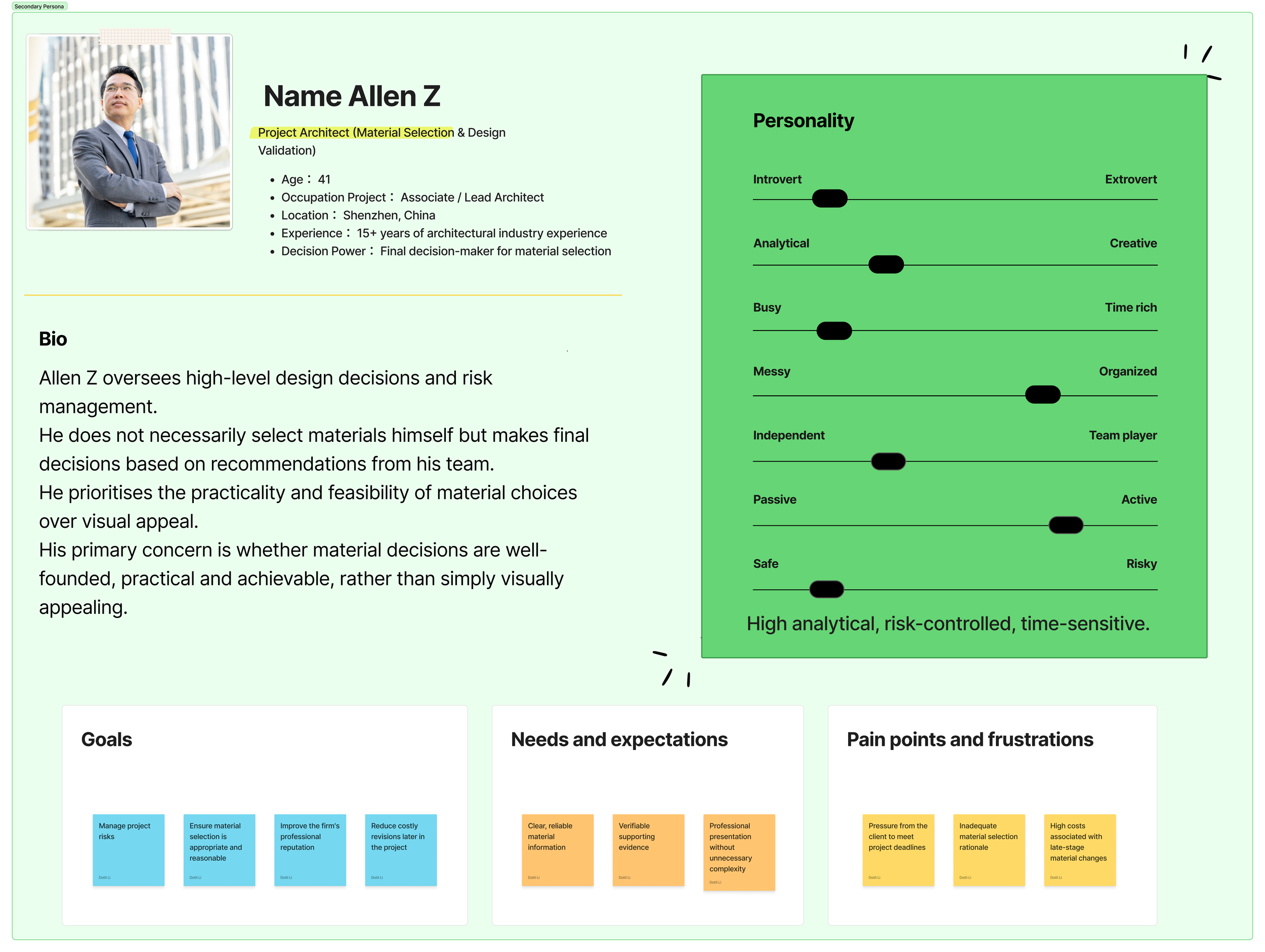
Secondary Persona — A senior architect responsible for material evaluation and final decision-making.
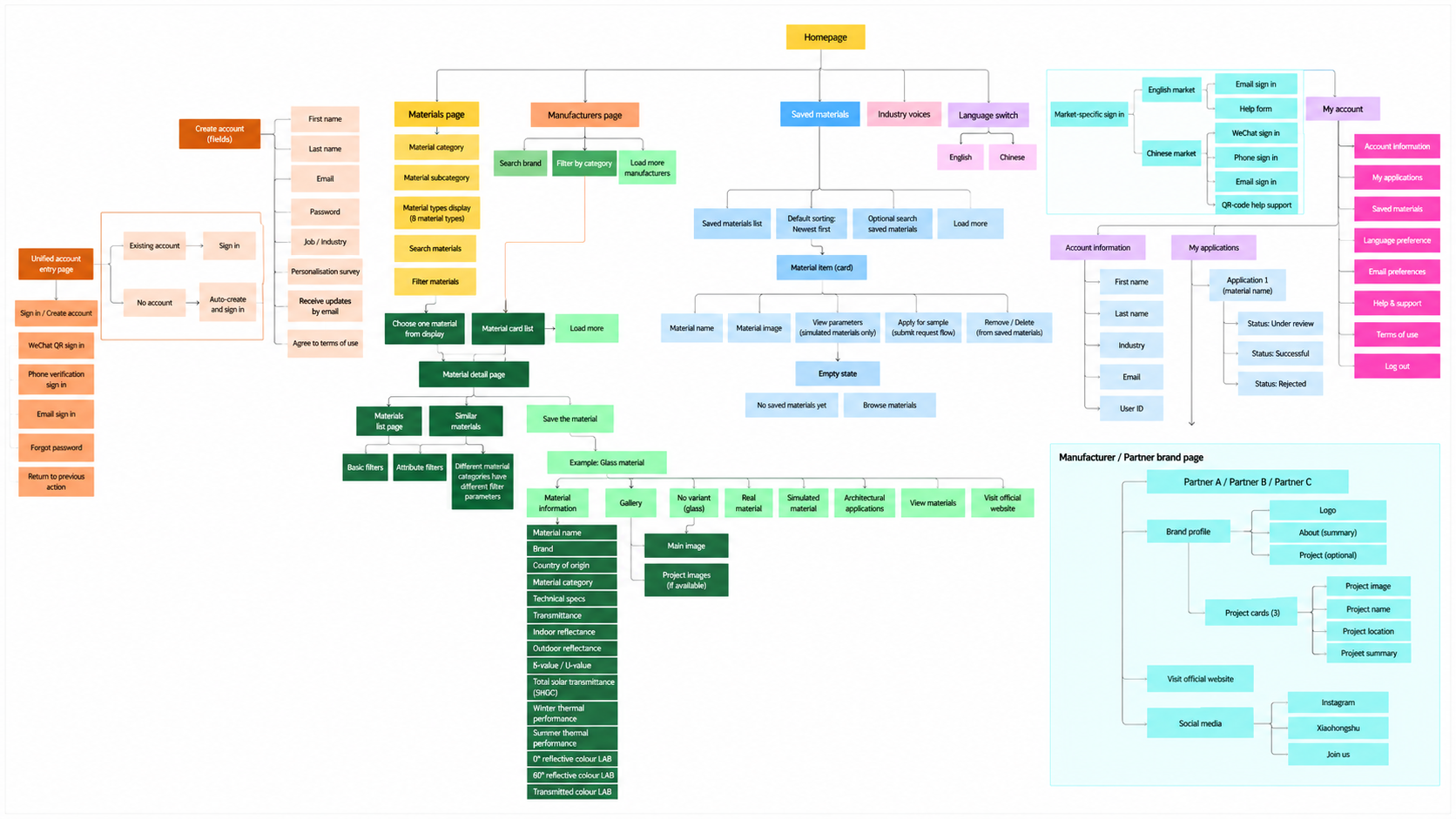
Detailed Information Architecture — Mapping platform features, navigation and key user flows to guide UX/UI design.
02. Discovery & Stakeholder Alignment
Establishing a Shared, User-Centred Design Process
Rather than moving directly into UI design, I facilitated collaborative stakeholder workshops to clarify business objectives, explore user needs and introduce a more structured approach to product decision-making.
I used personas and user journey mapping to demonstrate how architectural professionals might discover, evaluate and request materials. Competitive benchmarking helped inform the platform's navigation and discovery patterns.
From Assumptions to User Needs
The founders had developed an initial information architecture that they believed was sufficient for the platform. However, reviewing it through stakeholder workshops revealed gaps in navigation, content hierarchy and key user flows.
I worked with the founders to revisit the platform structure, using working personas and user journey mapping to connect material discovery, evaluation and enquiry with different user needs.
These became shared references for discussing new features, challenging assumptions and aligning stakeholder priorities.
Outcome
The process helped establish a collaborative, user-centred approach to decision-making and provided a clearer foundation for the product's structure and priorities.
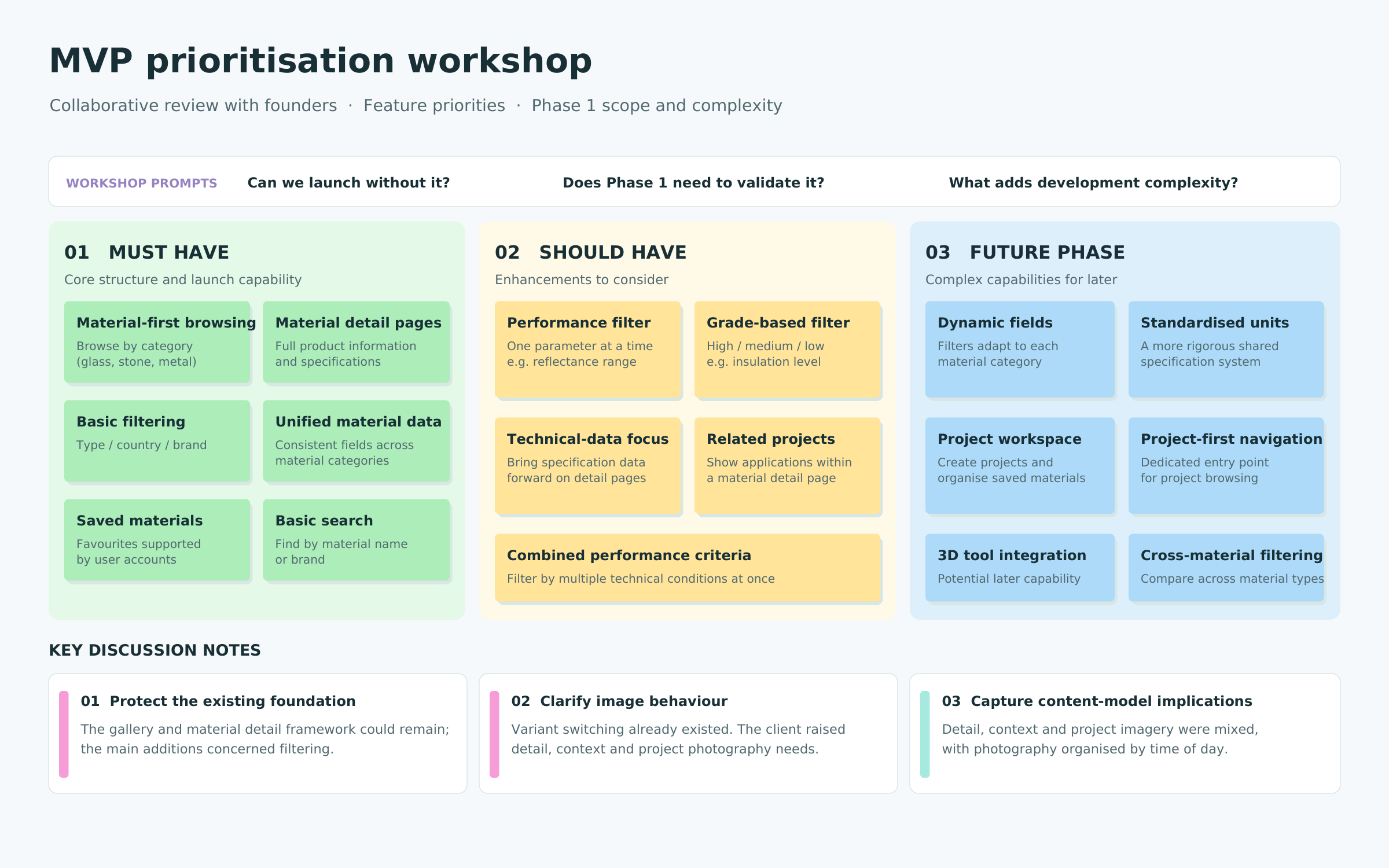
MVP Prioritisation Workshop — Aligning stakeholders on essential features, product priorities and the scope of the first release.
04. Designing Material Discovery
One Platform, Different User Needs
Through personas and stakeholder discussions, I identified two important discovery behaviours.
● Exploratory Discovery
Architects and designers seeking inspiration and new materials, prioritising imagery, intuitive categories and accessible browsing.
● Specification-Led Evaluation
Professionals making or influencing material decisions, needing detailed attributes, manufacturer information and efficient filtering.
My Design Approach
Restructuring Material Categories
I organised the material taxonomy around clearer relationships between categories, subcategories and product attributes.
● Progressive Filtering
The Materials Gallery supports visual browsing and specification-led evaluation, allowing users to narrow results by material category, brand, origin and relevant properties.
● Connecting Discovery with Evaluation
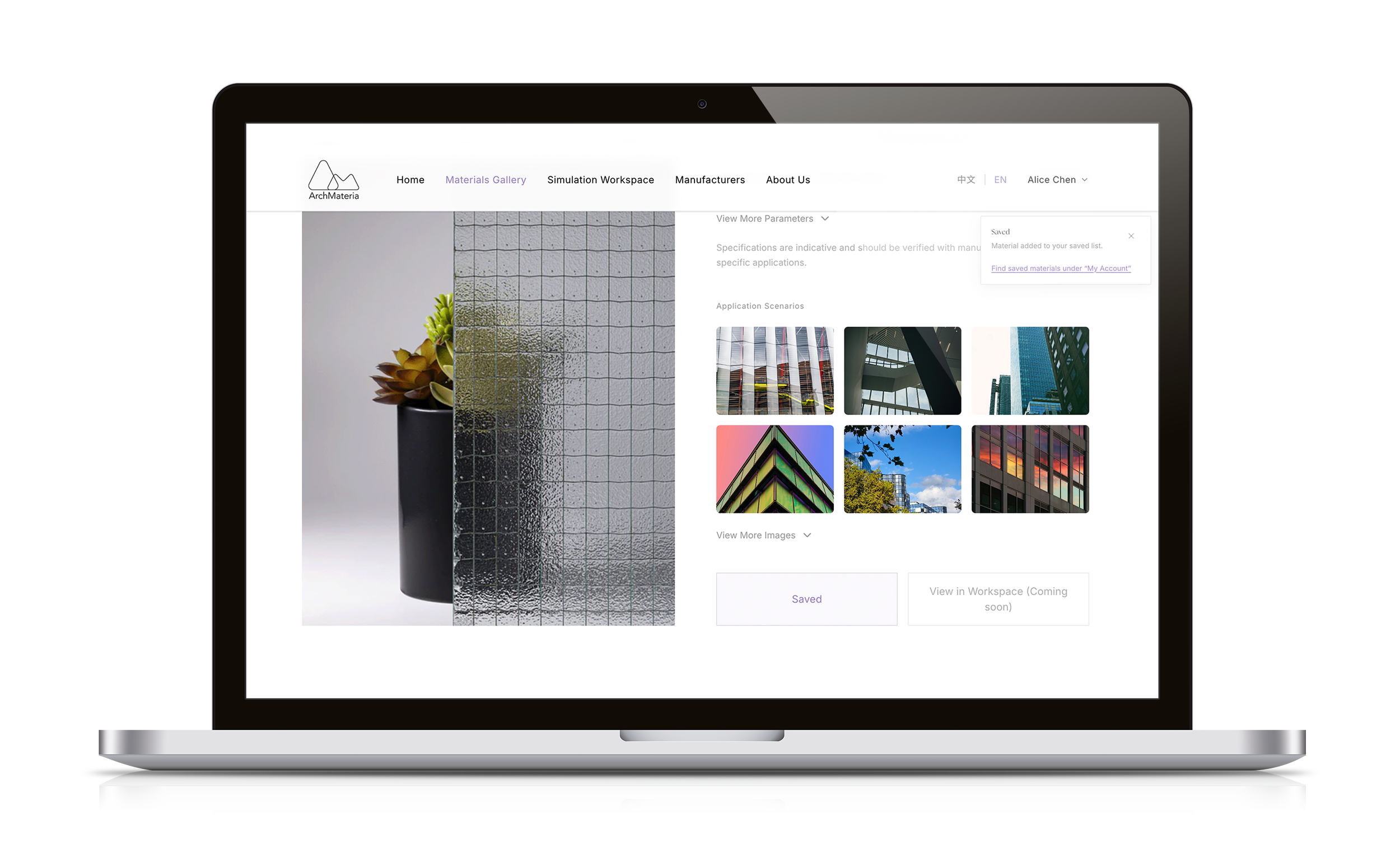
Product detail pages combine imagery, specifications and manufacturer information. Manufacturer profiles and Industry Voices provide additional context beyond the catalogue.
Outcome
Rather than separating users into different experiences, the revised structure supports a progression from visual inspiration to focused material evaluation within the same platform.
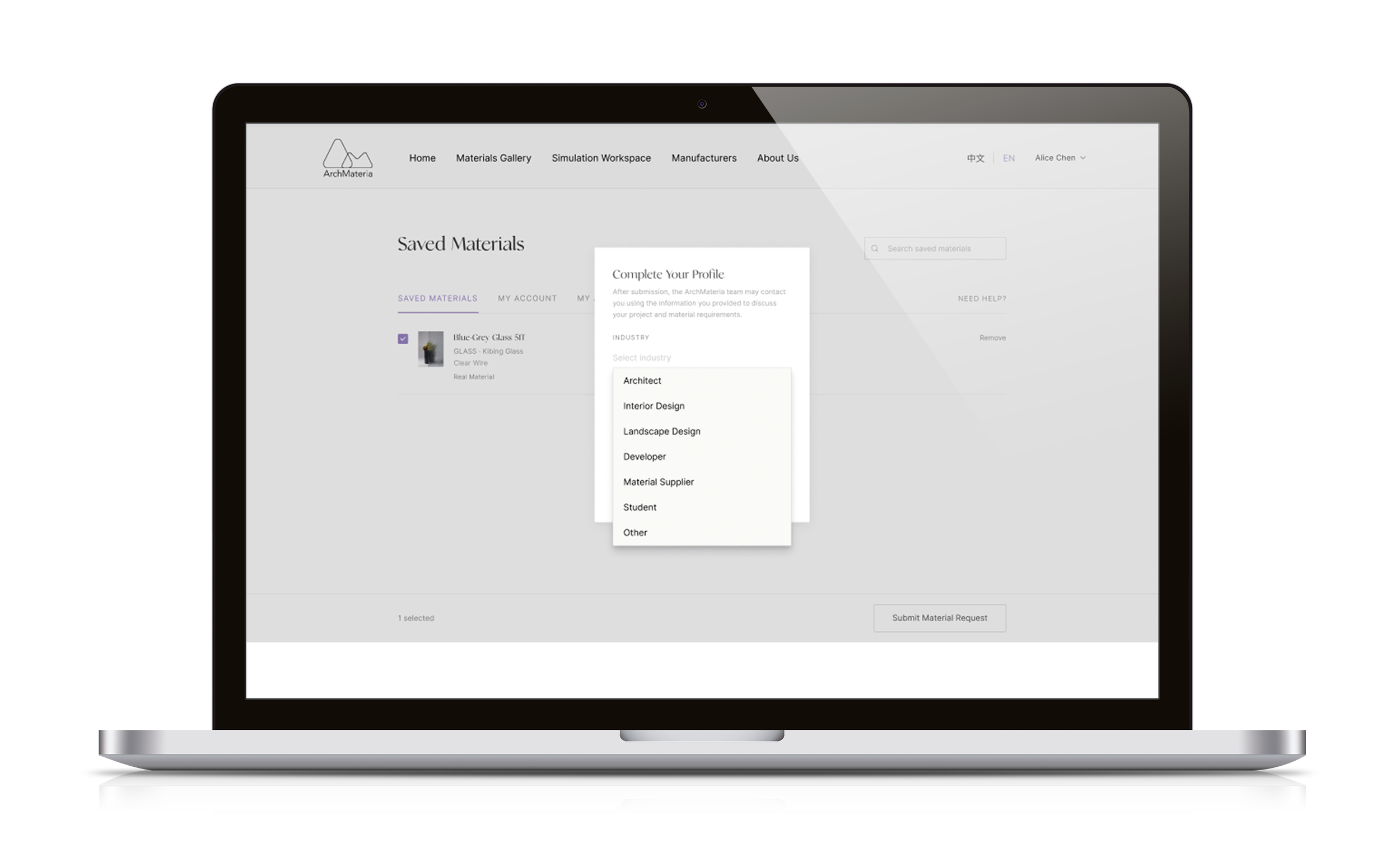
Profile Completion Before Enquiry
Users are prompted to complete essential profile details before submitting a material request.
06. Brand Strategy & Bilingual Experience
From an Early Business Concept to ArchMateria
The founders initially used the working name XX2XX, which did not fully reflect their ambition to attract architectural professionals and premium commercial partners.
Following discussions about the intended audience and positioning, I proposed ArchMateria, connecting architecture and materials in a more distinctive, industry-relevant identity.
I also developed the brand tagline:
“Where digital materials meet architectural imagination.”
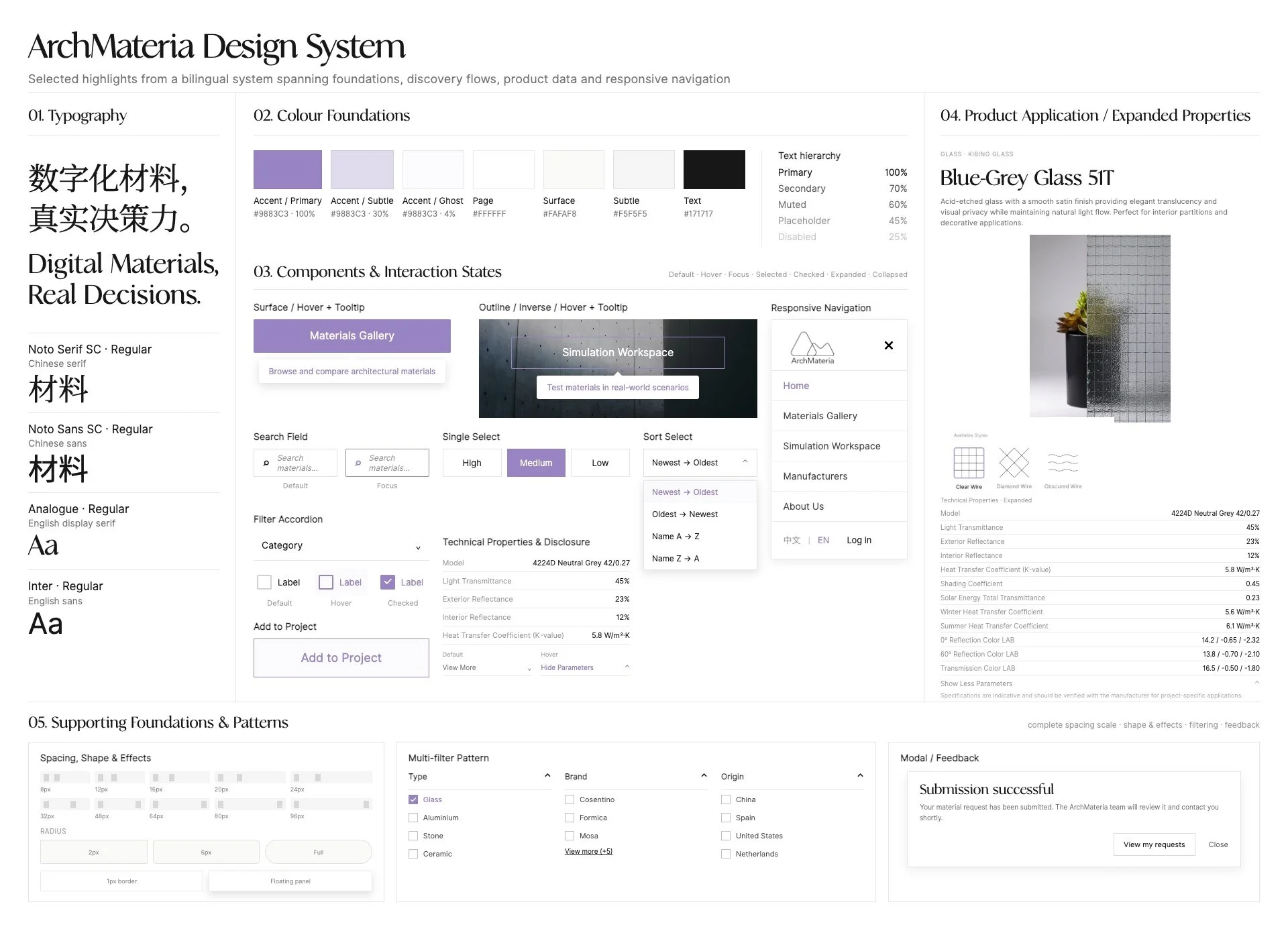
The resulting identity draws on architectural forms, material textures and graphic representations. I developed the logo, colour palette, typography, imagery direction and brand guidelines alongside the product's UX foundations.
Translating the Brand into UI
The interface combines material-led imagery, editorial typography and considered layouts with structured information and functional interactions.
For English, I selected Analogue for headings and Inter for body text, with Avenir used in the logo.
For Chinese, I paired Noto Serif SC with Noto Sans SC to maintain a related visual character across writing systems.
Localisation Beyond Translation
The Chinese and English versions share the same product architecture but adapt selected interactions for each market.
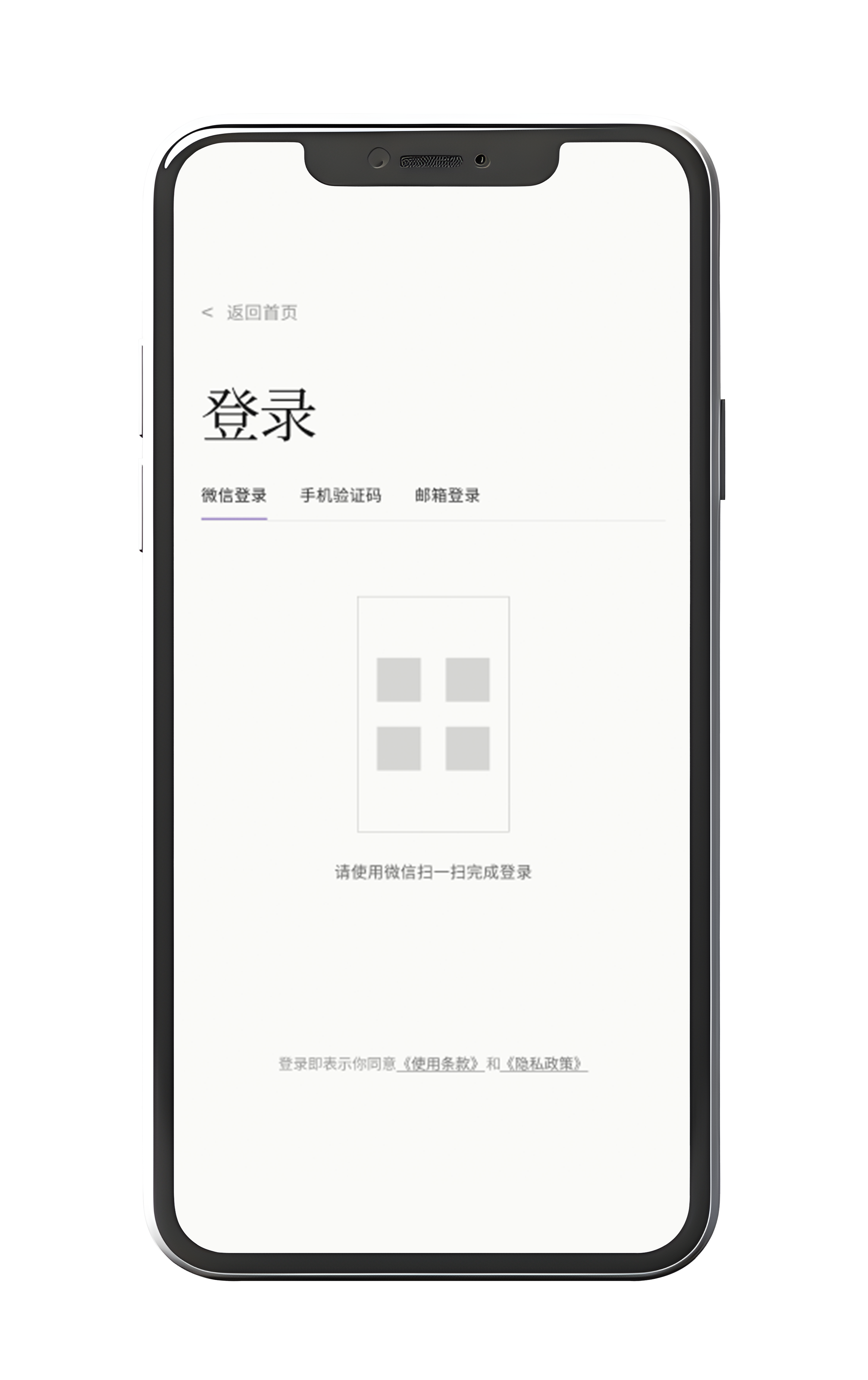
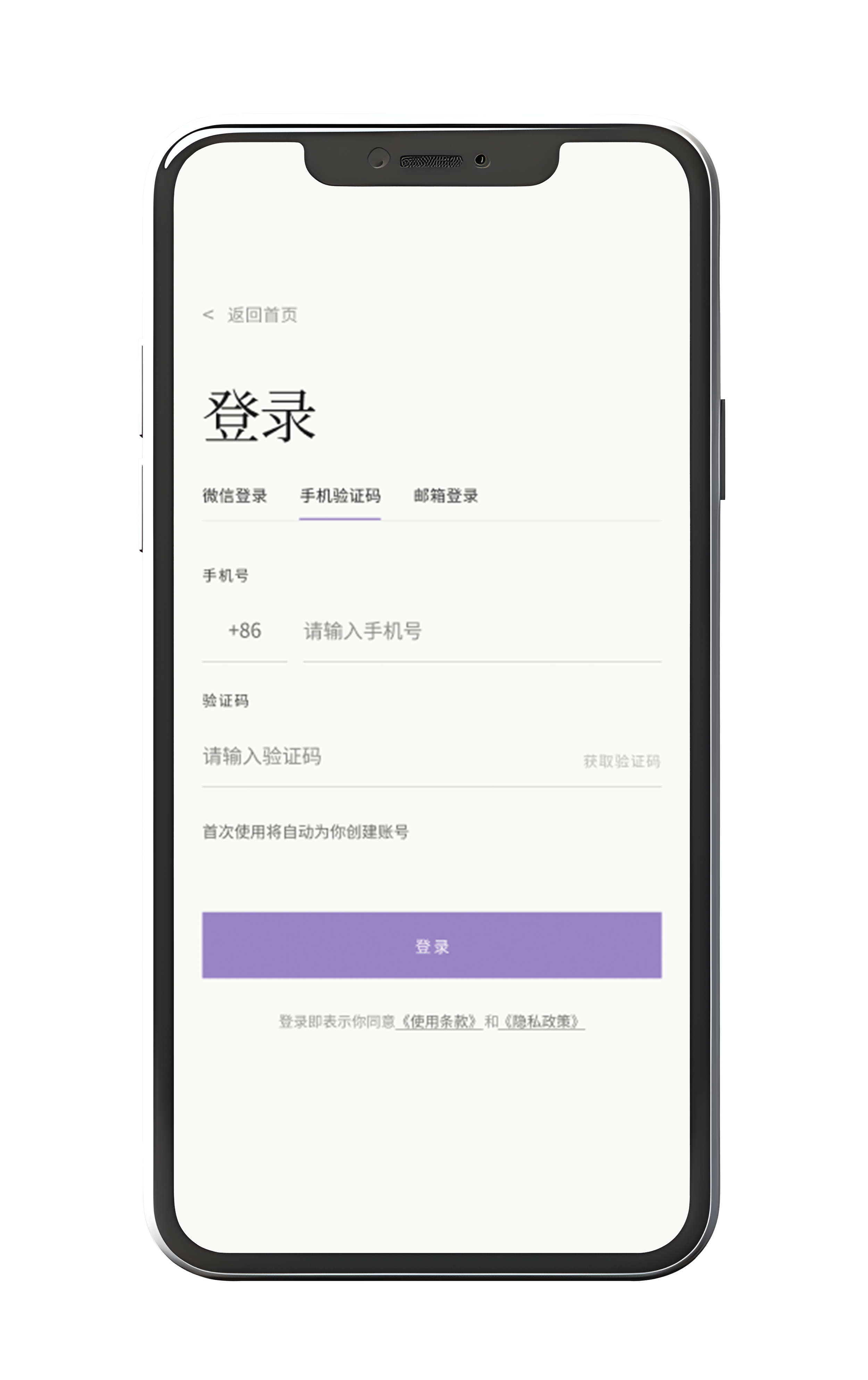
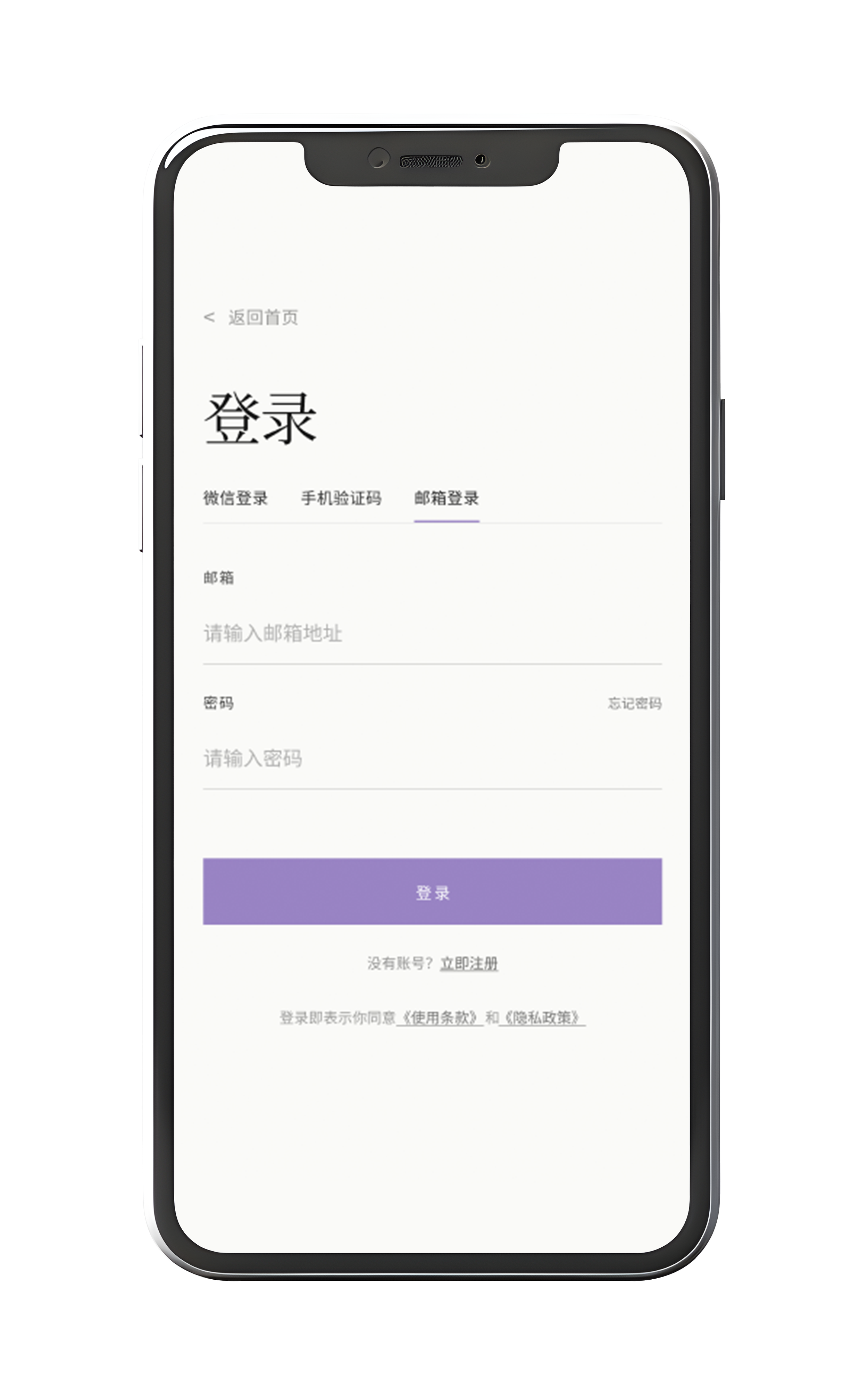
Chinese: WeChat, mobile verification and email authentication, with WeChat-based support.
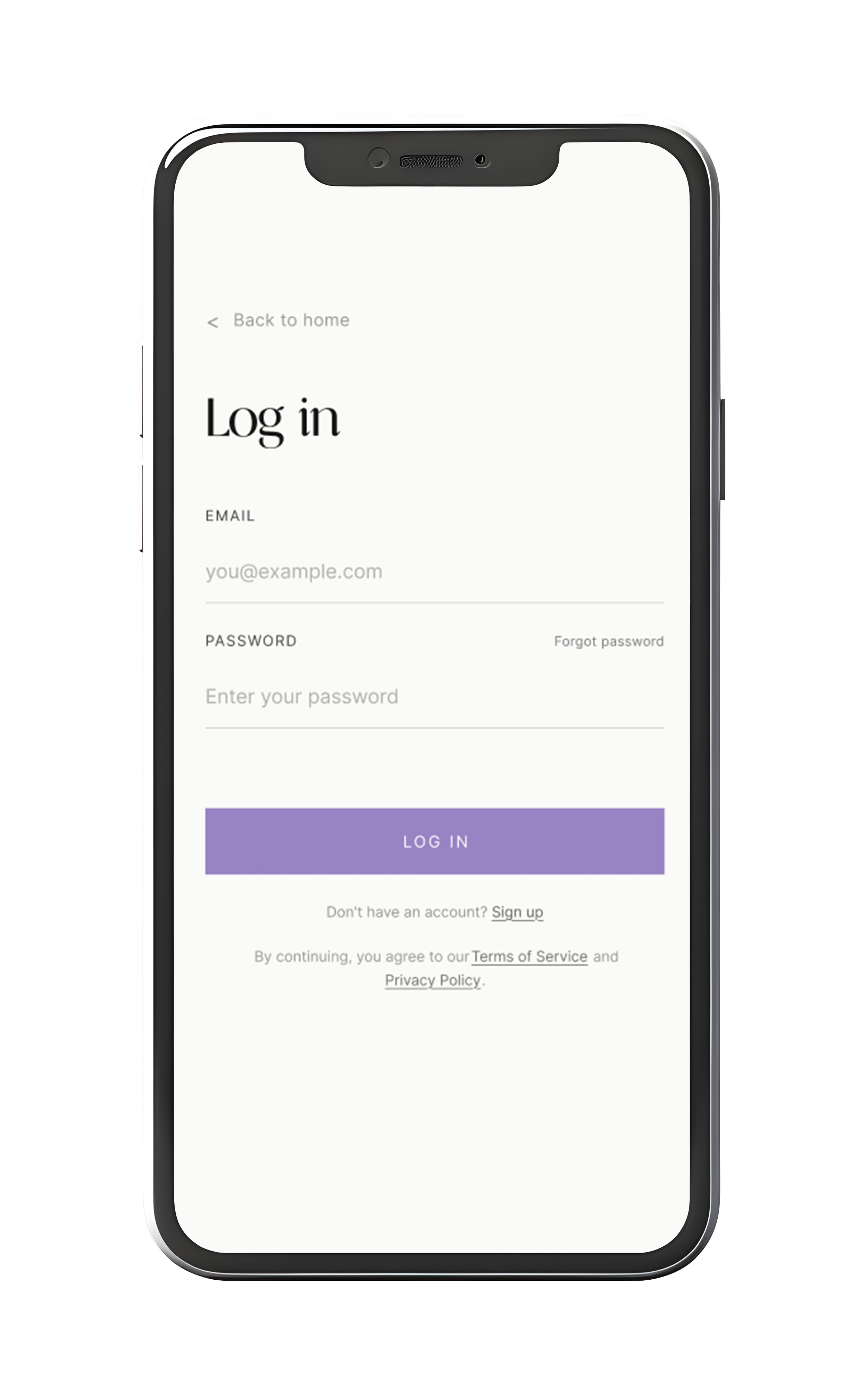
English: Email-based authentication and a contact form with validation and confirmation states.
I also developed responsive layouts across desktop, tablet and mobile, adapting navigation, filtering, forms and content hierarchy.
Outcome
The project established a cohesive brand and bilingual product experience designed for architectural professionals across languages and devices.
08. Project Outcomes & Deliverables
● Brand & Product Direction
Created ArchMateria's brand identity from scratch and helped the founders establish a clear product direction, balancing essential material sourcing features with the platform's longer-term vision.
● Product Strategy & Stakeholder Alignment
Facilitated collaborative workshops, challenged initial assumptions and introduced a structured approach to information architecture, user journeys and MVP prioritisation.
● End-to-End UX/UI Design
Designed a connected material sourcing experience, covering visual discovery, specification-based filtering, product evaluation, saved materials, enquiries and account management.
●Bilingual Design System & Delivery
Delivered responsive Chinese and English interfaces across desktop, tablet and mobile. Established reusable components, design foundations and documentation to support consistent implementation and developer handoff.
AI-Assisted Design Workflow
I integrated Figma Make, Figma Agent and AI-assisted design tools into my workflow to support interactive prototyping, design system documentation, consistency reviews and design iteration.
These tools helped streamline repetitive tasks and maintain consistency across bilingual interfaces and responsive layouts, while I remained responsible for design decisions and quality assurance.
I was also invited to present this AI-assisted design workflow at a Figma AI event, sharing how emerging tools supported the design process.
Reflection & Next Steps
ArchMateria reinforced the importance of challenging early assumptions and establishing a shared product understanding before moving into detailed interface design.
As the founding designer, I worked across brand strategy, product definition and end-to-end UX/UI design, helping transform an ambitious concept into a more structured and achievable product experience.
The next opportunity is to research and prototype the 3D Simulation Workshop, exploring how spatial visualisationcould support architectural material discovery and sourcing.
03. Product Strategy & MVP
Prioritising What Matters First
One of ArchMateria's key differentiators is its proposed 3D Simulation Workshop, where architects could visualise materials in architectural environments and potentially request products directly from the simulation.
However, this feature required further user research, interaction exploration and technical validation.
As the founders explored new ideas, I helped evaluate features against user value, the core sourcing journey and implementation complexity.
I recommended prioritising the essential discovery and enquiry experience while moving the Simulation Workshop into a future phase. The founders agreed.
● Phase 1: Core Platform
Materials Gallery, filtering, material details, manufacturer profiles, industry content, Saved Materials, enquiries, account management and bilingual responsive interfaces.
● Future Phase: Simulation Workshop
Research, prototype and validate spatial material visualisation, then explore its integration with the sourcing journey.
Outcome
This decision established a more focused first-release scope while preserving the platform's longer-term vision.
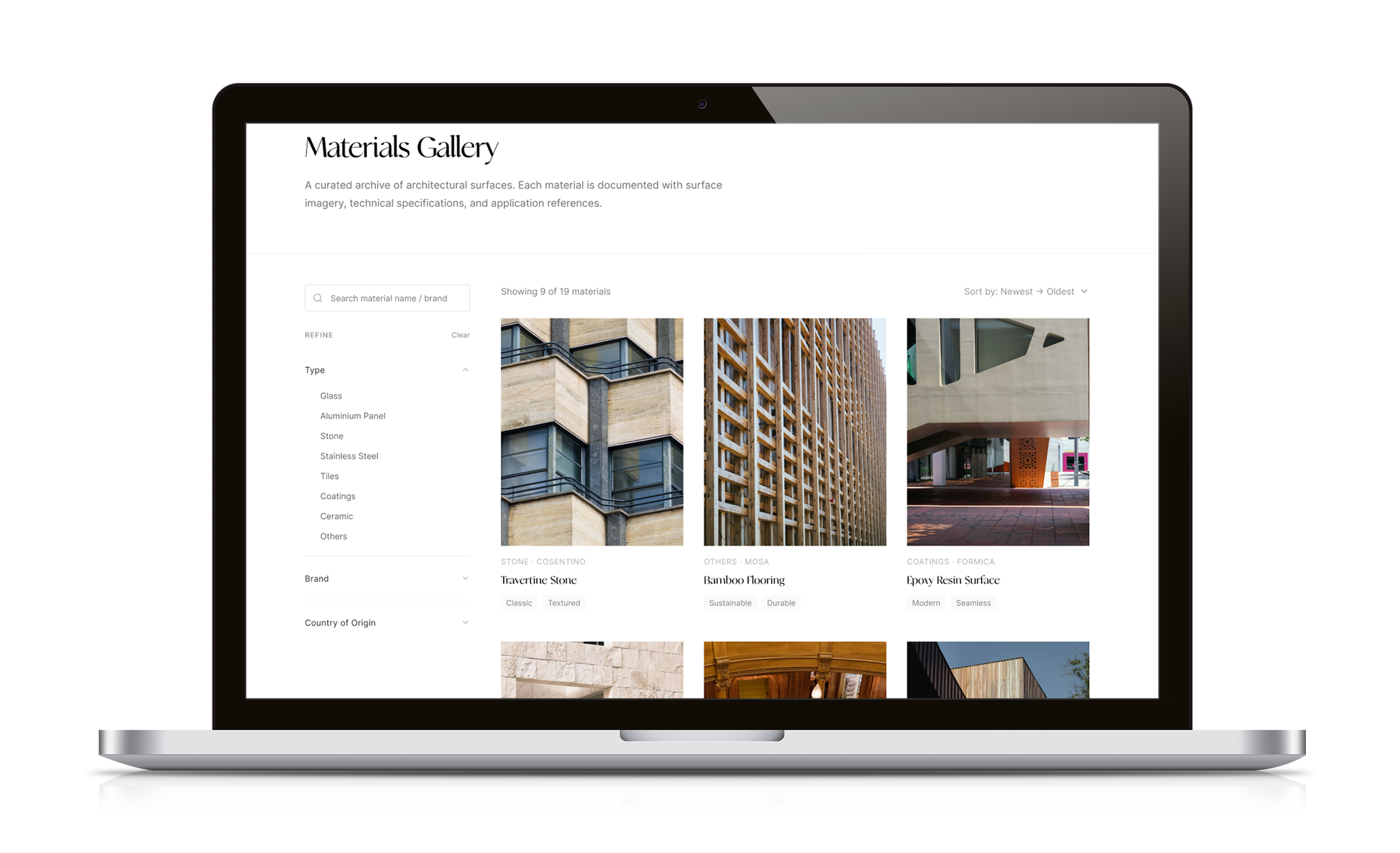
Exploratory Material Discovery
Visual browsing and category-based filtering support architects exploring materials for inspiration.
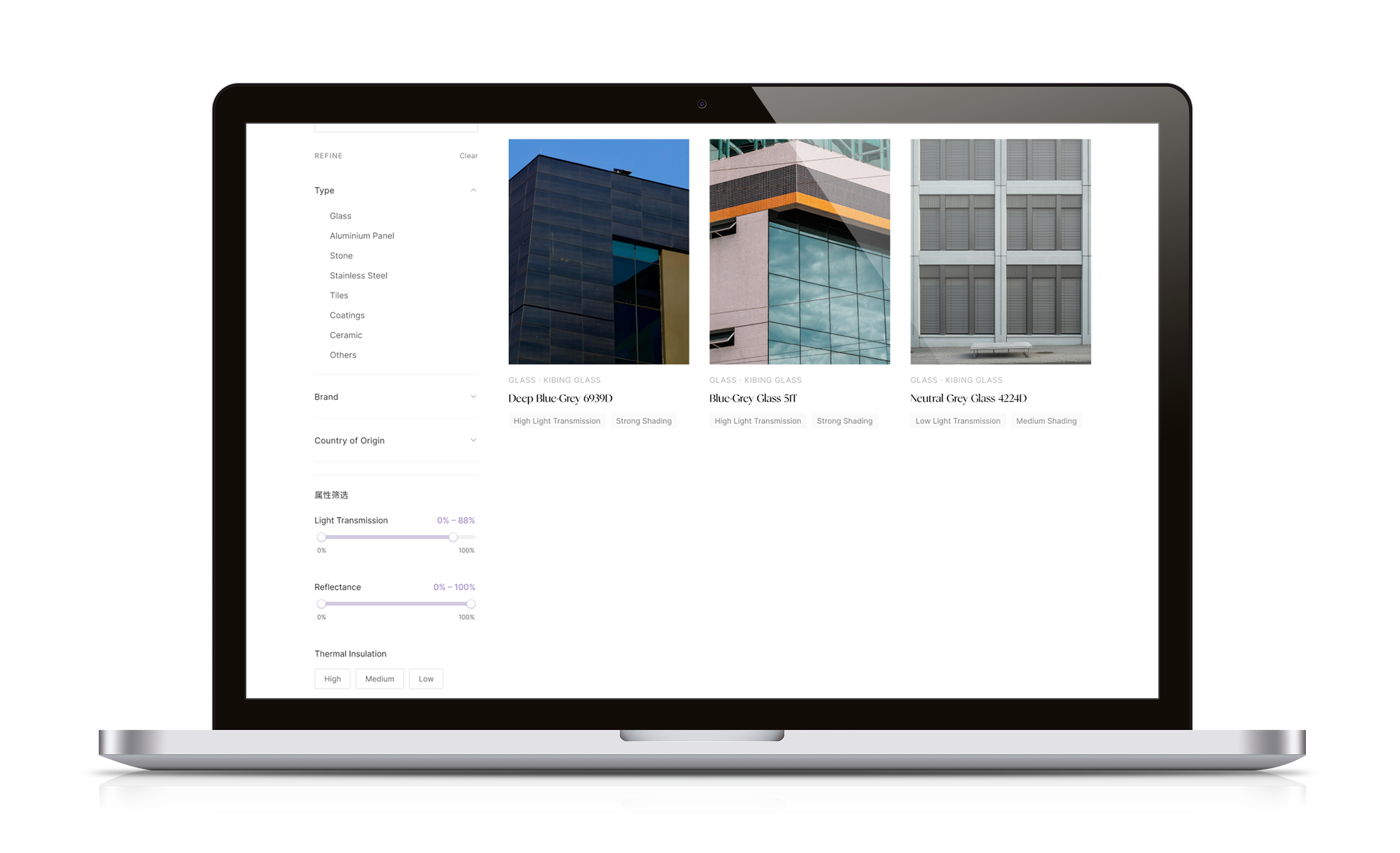
Specification-Led Material Evaluation
Technical filters help professionals narrow material options based on performance requirements.
05. Connecting Discovery to Enquiry
Designing the End-to-End Sourcing Journey
Architects often need to explore several materials before requesting more information. I designed a connected, end-to-end sourcing journey that supports this process:
Browse → Filter & Evaluate → Save Materials → Complete Request → Submit → My Applications
Key Design Decisions
Explore Before Signing In: Users can browse materials without creating an account, reducing barriers to discovery.
Save Before Enquiring: Users can collect and review multiple materials before submitting a request.
Authentication When Needed: Login and registration are introduced within relevant account-related workflows.
Clear Interaction Feedback: Saved states, validation, removal confirmation and submission feedback provide visibility and reassurance.
Continuity After Submission: Users can return to My Applications to review submitted requests.
Outcome
The workflow connects material discovery with enquiry generation, supporting a more continuous sourcing experience.
07. Usability Testing & Outcomes
Validating the Experience with Architects
I collected usability feedback from five participants with architectural backgrounds and different levels of experience.
The evaluation focused on material discovery, saving selections and navigating the enquiry process.
Feedback was generally positive, including encouraging responses to the visual design. However, some participants were unsure where to find their submitted material requests.
Finding → Design Iteration
While participants were generally able to explore and save materials, some were unsure where to find their submitted requests after completing the enquiry process.
This highlighted a gap in the post-submission user experience. In response, I refined the navigation and added clearer guidance connecting Saved Materials, submission confirmation and My Applications, helping users understand where to review their requests.
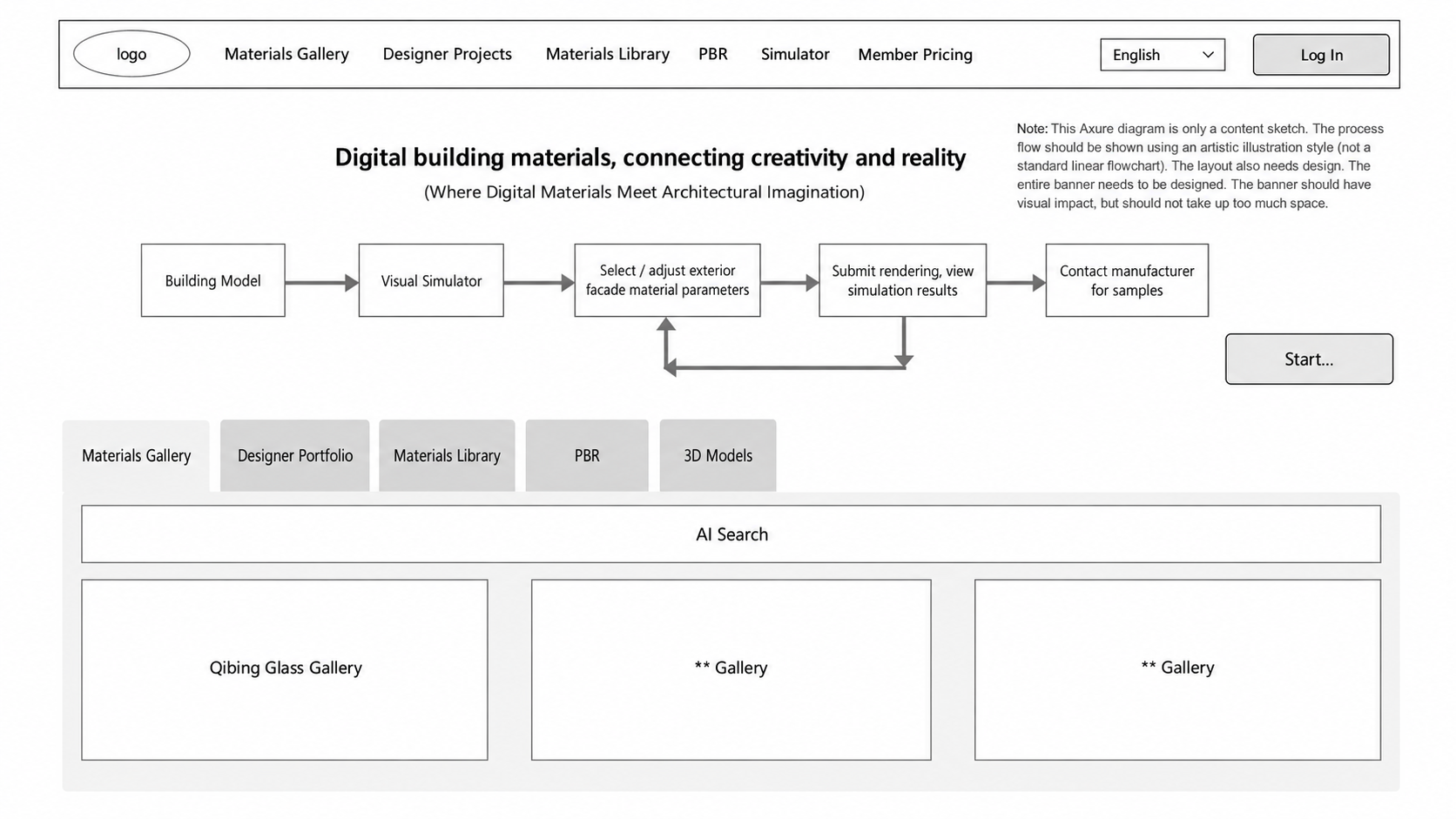
Client's Initial Information Architecture — The founders' original structure, which revealed gaps in navigation, user flows and feature organisation during review.
Information Architecture
From Early Concepts to a Shared Product Structure
Starting with the founders' original information architecture and exploratory wireframes, I reviewed the proposed structure to identify gaps in navigation, content organisation and user flows.
I developed a revised IA and worked closely with the founders to refine requirements, evaluate new features and align on the product structure before moving into detailed design.
Following stakeholder alignment, I expanded the agreed IA into a comprehensive design reference, mapping material discovery, filtering, saved materials, sample requests, account management and market-specific user flows to guide the UX/UI design process.
AI-Assisted Design System Documentation — Figma Agent supported the documentation of typography, colour, reusable components and interaction patterns.
Market-Specific Authentication — The Chinese experience supports WeChat, mobile verification and email login, while the English experience uses email-based authentication.
Post-Testing Navigation Refinement — Improved access to saved materials and submitted requests following usability feedback.